01
Give every session a limit.
Set time, battery, and data rules around the way you share your connection.
A LITTLE MORE CONTROL. EVERY DAY.
Share your connection with a little more peace of mind. Manage sessions, set limits, and keep your everyday hotspot tools in one place.
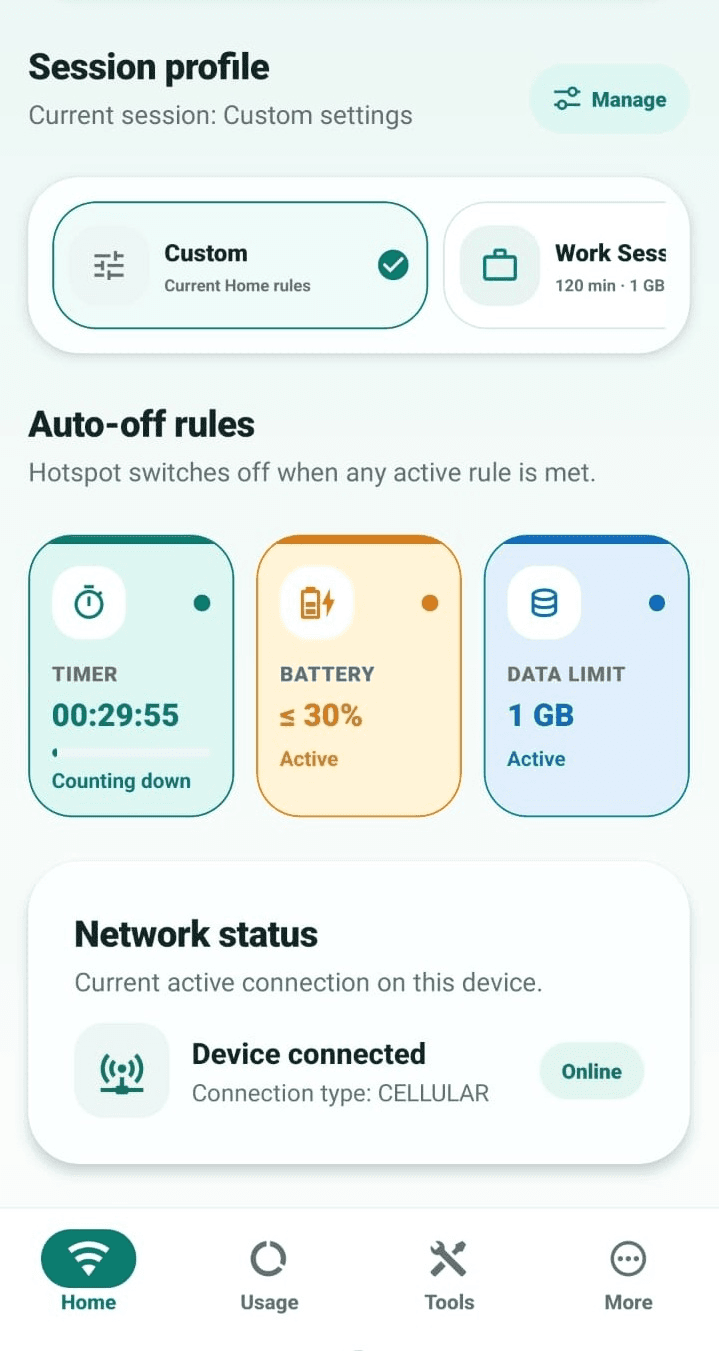
Actual app screen · Some features require Pro
Small tools.
A smoother routine.
BUILT AROUND YOUR DAY
From a quick laptop connection to a shared afternoon online, keep the useful details close.
Set time, battery, and data rules around the way you share your connection.
Review local session history and the usage readings available on your device.
Enter a network name and password to create a Wi-Fi QR code right on your phone.
Keep a reusable hotspot profile. Pro adds more profiles for different routines.
Use a home screen widget and notification actions, with extra customization in Pro.
Open network tools and run a speed test without leaving your hotspot companion.
Hotspot controls, usage readings, and automatic stopping depend on your device and Android permissions.
At your desk.
On the move.
On your terms.
A SIMPLE EVERYDAY FLOW
Choose your session rules and save a profile for the connection you use most.
Use the main control. If Android needs a system setting, the app guides you there.
Share a Wi-Fi QR code, follow your session, and review your local history later.
START FREE. MAKE IT YOURS.
Keep the core controls, rules, and network tools on Free. Choose Pro for more profiles, extended history, extra customization, and an ad-free experience.
Compare Free & ProMore room for
your own routine.
A LITTLE CLARITY
Useful answers about the app, its plans, and what to expect from Android.
Core hotspot session controls, timer, battery and data rules, network tools, and Wi-Fi QR sharing are available on the Free plan. An optional Pro subscription adds extra features and removes ads. Current pricing and any eligible offers are shown inside the app through Google Play.
Hotspot controls and automatic stopping depend on your Android version, phone manufacturer, and permissions. When direct control is unavailable, the app can guide you to Android Settings. Always check the status and any compatibility notice shown on your device.
Device discovery is best effort. Some connected devices do not respond to discovery, so a detected count is an estimate rather than a complete client list. If Android does not provide enough information, the app shows that the count is unavailable.
Usage readings depend on the information Android exposes on your device. They are a useful reference for your sessions, but availability and accuracy can vary. Use your carrier's own records for billing and allowance decisions.
The QR code is generated on your device using the network details you enter. Those details are not saved by the QR tool, and its temporary shared PNG is removed after the system share sheet finishes. Anyone who can scan the code can read the network credentials, so only share it with people you trust.
The current app is focused on Android. This website links to the Android app on Google Play.
YOUR CONNECTION. YOUR ROUTINE.
Start with the free tools. Find your everyday setup. Keep sharing on your terms.